What are Cursor rules for Java?
A curated collection of System prompts & Skills for Java Enterprise development that help software engineers and pipelines in their daily programming work.
Recently, we reached the milestone of 300+ ⭐ on GitHub. Many thanks to the users in Lanzhou, Singapore, Pontiac, Boardman, and Shanghai. 👋👋👋
What's new in this release?
In this release, the project introduces several updates and improvements:
- Added Skill Support:
- Published an initial set of 20 Skills for Java Enterprise development
- Improvements in System Prompts:
- Centralized version management and best practices for multi-module POM in
@110-java-maven-best-practices - Added
ArchUnitsupport in@111-java-maven-dependencies - Cyclomatic complexity analysis support in
@112-java-maven-plugins - Minimum Maven compiler support in
@112-java-maven-plugins @DEVELOPER.mdand plugin catalog in@113-java-maven-documentation- Added
@132-java-testing-integration-testingwith WireMock support - Split Java documentation into ADR capabilities in
@170-java-documentationand@171-java-adr - Added support to generate
AGENTS.mdwith@173-java-agents - Project improvements:
- Added a new generator to manage
SKILLgeneration - Added a validator to ensure good quality in
SKILLvalidation against the Skill Specification
Let's walk through each feature. You can also review the CHANGELOG.md
Why Skills?

The AI Assistants market is reshaping how we build software. A growing number of tools offer similar capabilities, yet until recently there was no standard way to extend them across vendors. Cursor pioneered System prompts, but that approach lacked a shared specification for others to adopt. A Skill fills that gap: it extends AI agents with specialized knowledge and workflows that work across different products.
This project has long focused on Prompt engineering and maintains a curated collection of System prompts (formerly Cursor rules). As Skills gained traction, we recognized that a Skill is essentially a System prompt with a standardized format—and that migrating to this format would keep the project relevant as the ecosystem evolves.
Each Skill lives in a SKILL.md file. The specification allows up to 600 lines per file, though files in the references folder may exceed that limit.
my-skill/
├── SKILL.md          # Required: instructions + metadata
├── scripts/          # Optional: executable code
├── references/       # Optional: documentation
└── assets/           # Optional: templates, resources
Source: https://agentskills.io/what-are-skills
One more detail: every Skill must include YAML frontmatter that defines its Metadata. Take a look at the following example from the Skill @110-java-maven-best-practices:
---
name: 110-java-maven-best-practices
description: Use when you need to review, improve,
or troubleshoot a Maven pom.xml file — including dependency management with
BOMs, plugin configuration, version centralization,
multi-module project structure, build profiles, or any situation
where you want to align your Maven setup with industry best practices.
Part of the skills-for-java project
metadata:
  author: Juan Antonio Breña Moral
  version: 0.12.0
---
Per the Skill specification, every Skill requires name and description in the metadata. The description matters: the model uses it to decide when to invoke the skill.
This release ships a new Skill generator—here are the results.
What Skills were generated in this release?
This release includes 20 Skills:
@110-java-maven-best-practices@111-java-maven-dependencies@112-java-maven-plugins@113-java-maven-documentation@121-java-object-oriented-design@122-java-type-design@124-java-secure-coding@125-java-concurrency@126-java-exception-handling@128-java-generics@131-java-testing-unit-testing@132-java-testing-integration-testing@141-java-refactoring-with-modern-features@142-java-functional-programming@143-java-functional-exception-handling@144-java-data-oriented-programming@170-java-documentation@171-java-adr@172-java-diagrams@173-java-agents
Planned for the next release:
@126-java-observability-logging@151-java-performance-jmeter@161-java-profiling-detect@162-java-profiling-analyze@163-java-profiling-refactor@164-java-profiling-compare@164-java-profiling-verify
Plus others tracked in the Backlog.
Previously, the project offered a CLI to install System prompts from this repo or any repo with .cursor/rules (or a symlink to it):
jbang setup@jabrena init \
--cursor https://github.com/jabrena/cursor-rules-java
With Skills, Vercel offers a better option at https://skills.sh/, where you can find and install Skills easily.
Browse this project's Skills here and install them with:
brew install node
npx skills add jabrena/cursor-rules-java --list
npx skills add https://github.com/jabrena/cursor-rules-java \
--skill 110-java-maven-best-practices
npx skills install jabrena/cursor-rules-java --all --agent cursor
One feature I like: Security pipelines that audit Skills for safety.
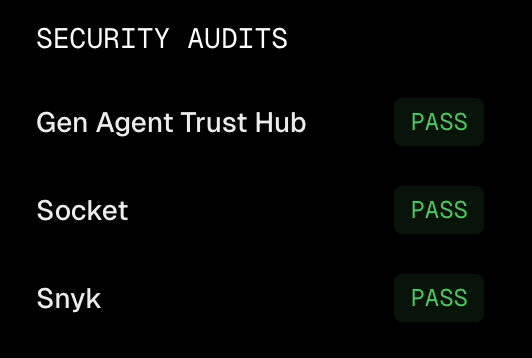
Source: https://skills.sh/jabrena/cursor-rules-java/110-java-maven-best-practices
Note: I recommend skills.sh and similar sites—Skills there have passed security audits. Be aware that Skills can include scripts, which may be an attack vector.
What are SkillsJars?
WebJars package popular web libraries for the JVM. SkillsJars applies the same idea to Skills: JVM agents can consume Skills as Maven artifacts. It was created by James Ward.
We've published a few Skills on SkillsJars to validate the approach; the full collection will follow.
skills.sh serves Skills from Git repos. SkillsJars goes further: Skills come from versioned Maven artifacts on Sonatype, which adds immutability.
Examples:
A Skill packaged as a JAR has this layout:
META-INF/
META-INF/skills/
META-INF/skills/jabrena/
META-INF/skills/jabrena/cursor-rules-java/
META-INF/maven/
META-INF/maven/com.skillsjars/
META-INF/MANIFEST.MF
META-INF/maven/com.skillsjars/jabrena__cursor-rules-java__111-java-maven-dependencies/pom.xml
META-INF/maven/com.skillsjars/jabrena__cursor-rules-java__111-java-maven-dependencies/pom.properties
META-INF/skills/jabrena/cursor-rules-java/111-java-maven-dependencies/SKILL.md
META-INF/skills/jabrena/cursor-rules-java/111-java-maven-dependencies/references/
META-INF/skills/jabrena/cursor-rules-java/111-java-maven-dependencies/references/111-java-maven-dependencies.md
Source: https://central.sonatype.com/artifact/com.skillsjars/jabrena__cursor-rules-java__111-java-maven-dependencies
Skill: @111-java-maven-dependencies
Using SkillsJars, you could publish your skills as JARs in your Artifactory:
<build>
    <plugins>
        <plugin>
            <groupId>com.skillsjars</groupId>
            <artifactId>maven-plugin</artifactId>
            <version>0.0.5</version>
            <executions>
                <execution>
                    <goals>
                        <goal>package</goal>
                    </goals>
                </execution>
            </executions>
        </plugin>
    </plugins>
</build>
Or declare Skills for your JVM agents like this:
<build>
    <plugins>
        <plugin>
            <groupId>com.skillsjars</groupId>
            <artifactId>maven-plugin</artifactId>
            <version>0.0.5</version>
            <dependencies>
                <!-- Your SkillsJars -->
                <dependency>
                    <groupId>com.skillsjars</groupId>
                    <artifactId>SKILLJAR_ARTIFACT_ID</artifactId>
                    <version>SKILLJAR_VERSION</version>
                </dependency>
            </dependencies>
        </plugin>
    </plugins>
</build>
After adding SkillsJars to your build, extract them for use with your AI tool:
./mvnw skillsjars:extract -Ddir=.agents/skills
For more on SkillsJars and Spring AI:
- https://www.skillsjars.com/?bt=maven&q=maven
- https://github.com/skillsjars/skillsjars-maven-plugin
- https://github.com/skillsjars/skillsjars-example-spring-ai
- https://spring.io/blog/2026/01/13/spring-ai-generic-agent-skills
Note: Quarkus and Micronaut will likely add support soon.
Awesome third party Skills
On the Internet, several awesome Skills exist that complement this project—take a look and, if you like, use them!
Good design practices by @eferro
The design catalog offers skills for collaborative design, event modeling, hexagonal architecture, and modern CLI design. These skills guide agents toward structured, domain-driven design decisions and clean architectural boundaries.
Good testing practices by @eferro
The testing catalog covers TDD, approval tests, BDD with approvals, mutation testing, nullables handling, and test desiderata. Agents can follow disciplined red-green-refactor workflows and write behavior-focused tests.
Architecture skills by @tech-leads-club
The tech-leads-club architecture catalog provides skills for domain analysis, component identification, coupling analysis, decomposition planning, legacy migration, and frontend blueprints. Agents can support modular design, bounded contexts, and migration roadmaps.
PreCommit by @julianobarbosa
A skill for managing pre-commit hooks—the multi-language framework that automates code quality, formatting, linting, and security scanning.
JDB Agentic Debugger @brunoborges
An agent skill for debugging Java applications in real time with JDB (Java Debugger CLI).
Why Agents.md?
Most Git repos have a README.md that explains the product. Often it mixes product and technical details. @113-java-maven-documentation generates DEVELOPER.md for Maven build commands and Maven profile details. But what about when you work with AI models? That gap is what AGENTS.md fills.
The @173-java-agents Skill generates an AGENTS.md file through an interactive workflow.
Further reading:
Awesome MCP Servers & CLI tools for Java
AI models run offline and rely on third-party tools for external access. Cursor and Claude store MCP config in mcp.json:
{
    "mcpServers": {
        ...
    }
}
Recommended MCP and CLI tools in this article:
Maven tools
An MCP server that provides AI assistants with Maven Central dependency intelligence for all JVM build tools (Maven, Gradle, SBT, Mill). It features Context7 integration for documentation support.
{
    "mcpServers": {
        "maven-tools": {
            "command": "docker",
            "args": [
                "run",
                "-i",
                "--rm",
                "arvindand/maven-tools-mcp:latest"
            ]
        }
    }
}
This MCP tool is a strong alternative to the Versions Maven plugin:
<!-- Versions Maven Plugin -->
<plugin>
    <groupId>org.codehaus.mojo</groupId>
    <artifactId>versions-maven-plugin</artifactId>
    <version>${maven-plugin-versions.version}</version>
</plugin>
Using the Maven plugin, you can check whether a dependency can be updated with:
# Check for dependency updates
./mvnw versions:display-dependency-updates
# Check for plugin updates
./mvnw versions:display-plugin-updates
# Check for property updates
./mvnw versions:display-property-updates
The MCP tool goes further: it can apply updates, not just report them.
- https://github.com/arvindand/maven-tools-mcp
- https://hub.docker.com/mcp/server/maven-tools-mcp/overview
Javadocs
Maven Central artifacts ship JavaDoc Jars. IDEs show them inline, but sometimes you want to browse in a browser. This web app lets you view JavaDocs for any artifact or connect via MCP.
{
    "mcpServers": {
        "javadocs": {
            "url": "https://www.javadocs.dev/mcp"
        }
    }
}
GitHub's official MCP Server
The GitHub MCP Server connects AI tools directly to GitHub's platform. This gives AI agents, assistants, and chatbots the ability to read repositories and code files, manage issues and PRs, analyze code, and automate workflows. All through natural language interactions.
{
    "mcpServers": {
        "github": {
            "command": "docker",
            "args": [
                "run",
                "-i",
                "--rm",
                "-e",
                "GITHUB_PERSONAL_ACCESS_TOKEN",
                "ghcr.io/github/github-mcp-server:latest"
            ],
            "env": {
                "GITHUB_PERSONAL_ACCESS_TOKEN": "YOUR_TOKEN_HERE"
            }
        }
    }
}
Atlassian MCP Server
Remote MCP Server that securely connects Jira and Confluence with your LLM, IDE, or agent platform of choice.
{
    "mcpServers": {
        "atlassian": {
            "url": "https://mcp.atlassian.com/v1/mcp"
        }
    }
}
SonarQube MCP Server
The SonarQube MCP Server is designed to integrate code quality and code security tools with your favorite MCP clients.
{
  "mcpServers": {
    "sonarqube": {
      "command": "docker",
      "args": [
        "run",
        "-i",
        "--rm",
        "--init",
        "--pull=always",
        "-e",
        "SONARQUBE_TOKEN",
        "-e",
        "SONARQUBE_ORG",
        //"-e",
        //"SONARQUBE_URL",
        "mcp/sonarqube"
      ],
      "env": {
        "SONARQUBE_TOKEN": "<YourSonarQubeUserToken>",
        "SONARQUBE_ORG": "<YourOrganizationName>",
        //"SONARQUBE_URL": "https://sonarqube.us"
      }
    }
  }
}
Effect Oriented Programming book as MCP
The Effect Oriented Programming book is available as an MCP (Model Context Protocol) server, enabling you to use AI assistants to explore and interact with the book's content directly within your development environment.
{
    "mcpServers": {
        "eop-book": {
            "url": "https://mcp.effectorientedprogramming.com"
        }
    }
}
Note: I like this MCP because it is a nice and honest way to monetize the author's effort.
Many MCP tools ship as Docker images to simplify installation and improve security. Browse the Docker MCP Catalog for more:
How to use Prompts, Agents.md, Skills & MCP/CLI tools in your daily workflow?
In 2026, AI tools are essential—but which ones you use depends on your organization and project. Check with your Platform Engineering team to see which AI tools, Skills, and MCP/CLI tools are approved.
With Agile (Intents, Epics, User Stories, Tasks), start by reviewing your backlog and ensuring tasks are ready for development.
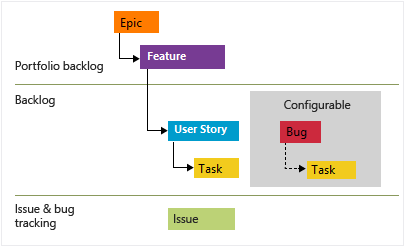
Use System prompts for Agile to improve analysis and design: Epics, Features, User Stories (with Gherkin), diagrams, and solutions for functional and non-functional requirements (ISO-25010).
These tools boost delivery. To keep pace, consider a Double Agile Loop for defining User Stories:
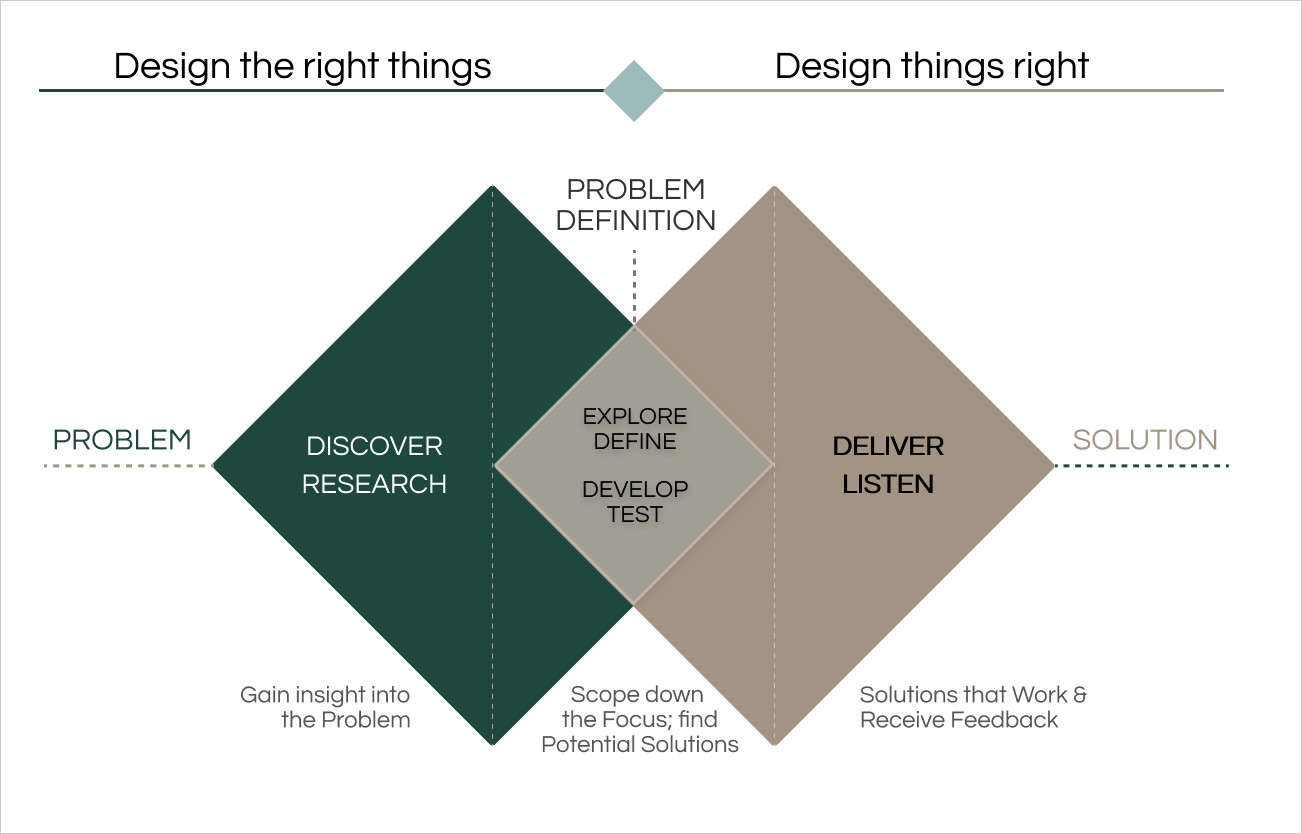
Source: https://www.stride.build/blog/what-is-dual-track-agile-and-how-does-it-work
Solving a User Story with a Prompt Engineering approach
Suppose you pick up this User Story from the backlog:
As an API consumer / data analyst
I want to consume God APIs (Greek, Roman & Nordic), filter gods whose names start with 'n', convert each filtered god name into a decimal representation, and return the sum of those values
So that I can perform cross-pantheon analysis and aggregate mythology data for research, reporting, or educational applications.
and it includes acceptance criteria:
Feature: God Analysis API
# REST API: GET /api/v1/gods/stats/sum
# Notes:
# - Decimal Conversion Rule: Name then each char to its Unicode int value, then concatenate these ints as strings.
# (e.g., "Zeus" -> Z(90)e(101)u(117)s(115) -> "90101117115").
# - If in the process to load the list, the timeout is reached, the process will calculate with the rest of the lists.
# - Filtering for gods starting with 'n' is case-sensitive (only lowercase 'n').
# - Greek API: https://my-json-server.typicode.com/jabrena/latency-problems/greek
# - Roman API: https://my-json-server.typicode.com/jabrena/latency-problems/roman
# - Nordic API: https://my-json-server.typicode.com/jabrena/latency-problems/nordic

  Background:
    Given the God Analysis API is available at "/api/v1"
    And the system is configured with an API call timeout of 5 seconds

  Scenario: Happy path - Get sum with explicit sources
    When the client sends a GET request to "/gods/stats/sum" with query parameters "filter" = "n" and "sources" = "greek,roman,nordic"
    Then the response status code should be 200
    And the response body should contain a JSON object with a "sum" field
    And the value of "sum" should be "78179288397447443426"
and finally you see that the development requires this stack:
- Java 25
- Spring Boot 4.0.x
- Spring Boot Modulith
- RestClient
- Junit
- Wiremock
- RestAssured
Clone the repo and verify the build. Check for an AGENTS.md file—if missing, use @173-java-agents to generate one.
Next, create a Plan. Cursor and Claude both support plan generation.
- https://cursor.com/docs/agent/plan-mode
- https://code.claude.com/docs/en/common-workflows#use-plan-mode-for-safe-code-analysis
Review and iterate until the Plan is stable, then hand it to the model. Include design artifacts, OAS files, and Gherkin in the context.
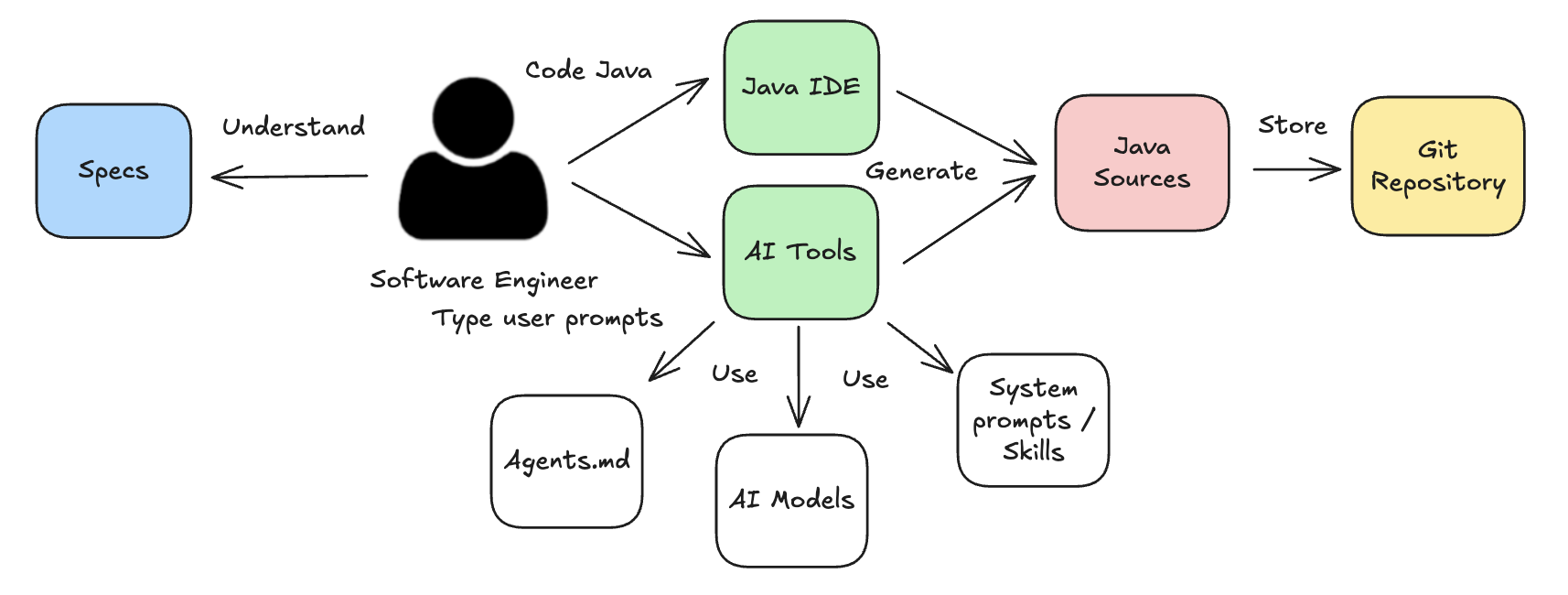
Expect to iterate. Have the model verify its own changes rather than doing it manually. AGENTS.md helps here—it documents the technical details the model needs.
When executing the plan, you can choose:
- Use a TDD approach
- Implement using Chicago style (inside-out)
- Implement using London style (outside-in)
Depending on your preferences, you can build a plan that includes a task list like this:
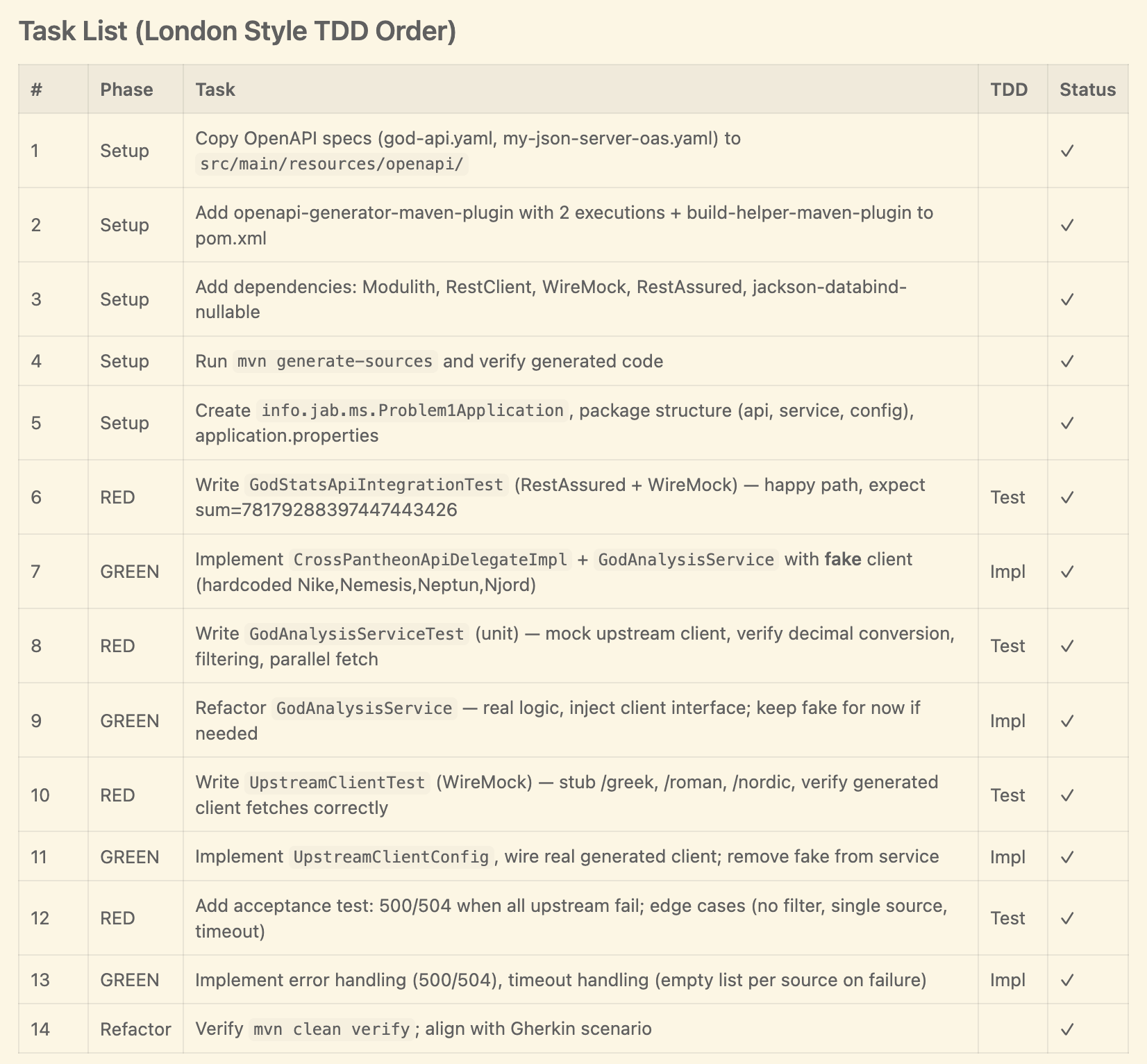
Read this section carefully and explore this approach. In the following Git repository, you could find other non-trivial problems: https://github.com/jabrena/latency-problems that you could solve with this approach.
Enhance your pipeline with AI Tools
If you are interested in adding AI Capabilities to your pipelines:
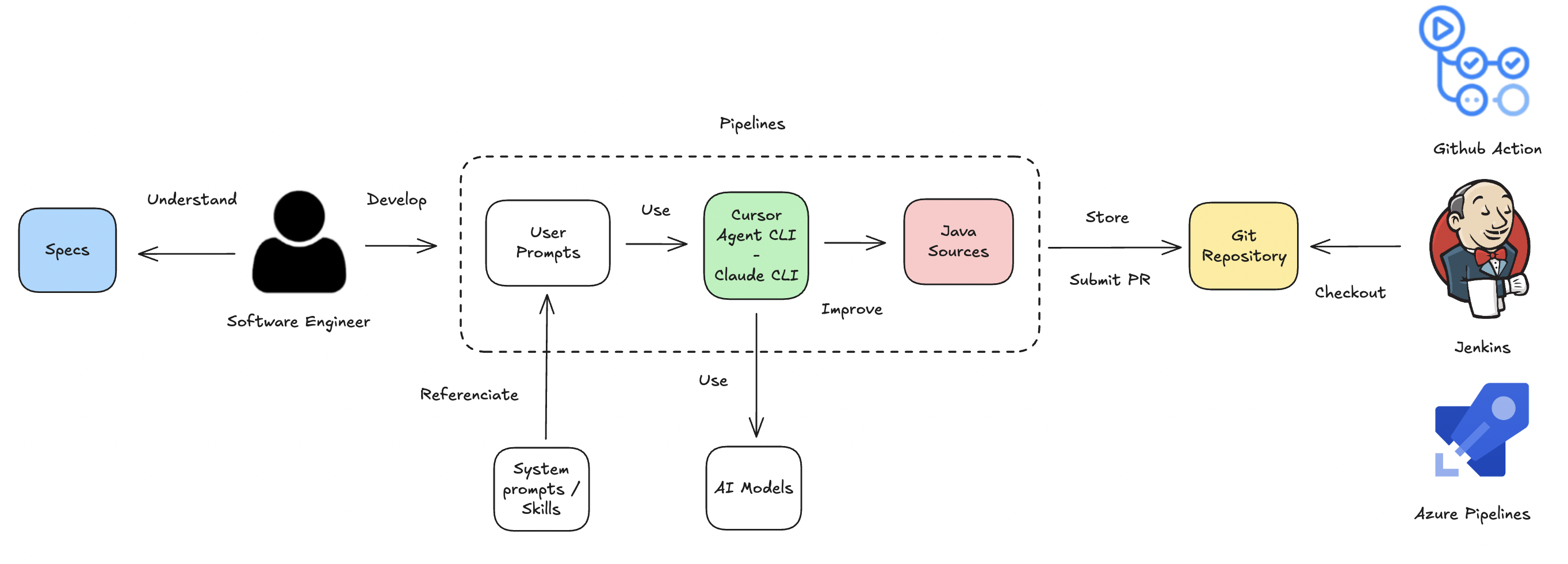
I recommend reading the following article: https://www.javaadvent.com/2025/12/delegating-java-tasks-to-supervised-ai-dev-pipelines.html
But not everything is perfect—your repository is full of configuration folders
Currently, every product has a particular folder like .cursor, .claude, .agents, .ai, etc. This is horrible, but it is part of the game. At some point, these kinds of configuration folders should be unified, meanwhile, we need to have patience.
Improvements in System prompts
Since the previous version, the project has invested time improving the current System prompts, which are part of the new Skills under the hood.
Improvements in Maven:
- Centralized version management and best practices for multi-module POM in
@110-java-maven-best-practices: Added support for multi-module projects with Maven. - Added
ArchUnitsupport in@111-java-maven-dependencies: Makes this popular dependency available for addition to any project. - Cyclomatic complexity analysis support in
@112-java-maven-plugins: This new profile helps models offer hints to reduce complexity in development. - Minimum Maven compiler support in
@112-java-maven-plugins: Added a minimum configuration for this essential Maven plugin. @DEVELOPER.mdand plugin catalog in@113-java-maven-documentation: Renamed the fileREADME-DEV.mdtoDEVELOPER.md. On the other hand, the generation is now dynamic.
Improvements in Testing:
- Added
@132-java-testing-integration-testingwith WireMock support: Initial support for integration test scenarios without framework usage. In the future, support will be added for databases, Kafka, and others.
Improvements in Architecture:
- Split Java documentation into ADR capabilities in
@170-java-documentationand@171-java-adr: Decoupled the documentation for Java development from documentation about Architecture tasks.
Improvements in the interactions with LLMs:
- Added support to generate
AGENTS.mdwith@173-java-agents: Added this specific missing feature.
Conclusions
If you followed the article, the project is evolving from System prompts to Skills—and continues to advance practices such as curated shared instructions for software teams and AGENTS.md, both recognized in the Thoughtworks Technology Radar. During the time between v0.11.0 to v0.12.0, new elements have appeared in the market, such as: Subagents, Commands, Hooks, Plugins, Spec-driven. In the next release, the project will review how to use Skills with Subagents.
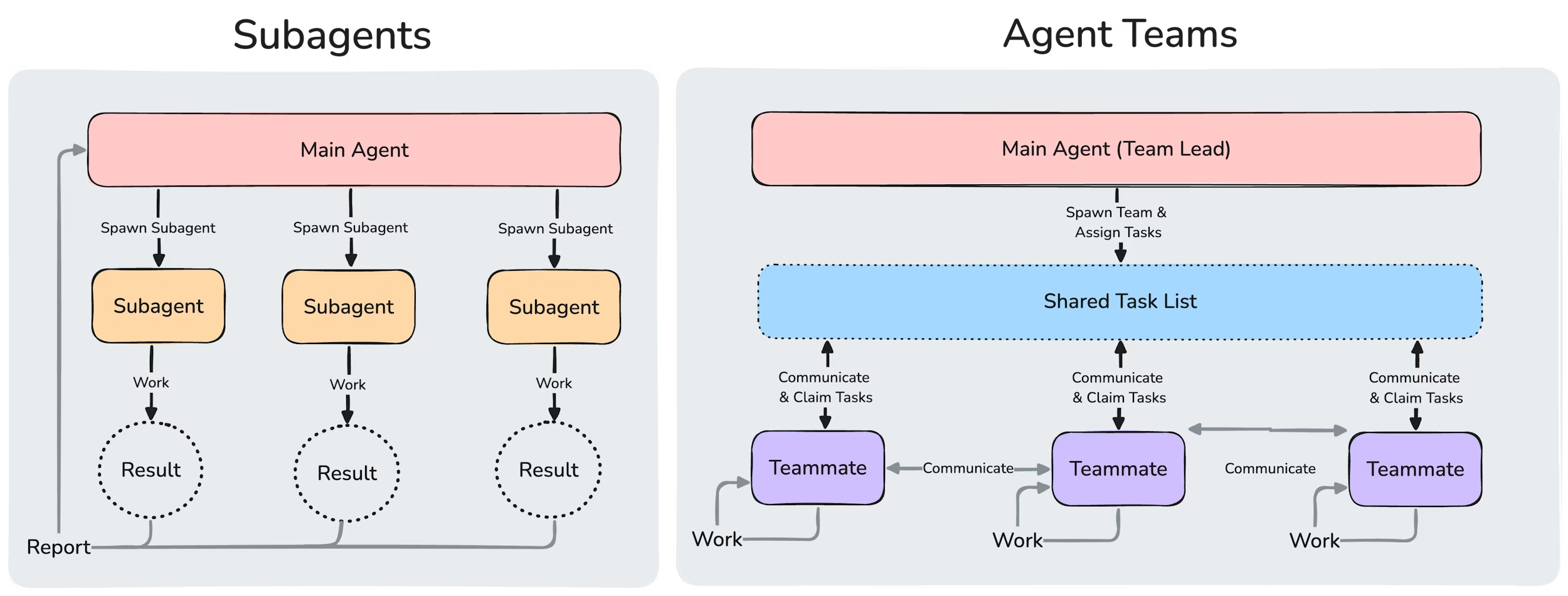
Source: https://code.claude.com/docs/en/agent-teams
When you talk with people using these technologies, you notice that software delivery has increased—but design and requirements gathering must keep pace on quality too. If you accelerate delivery without investing in requirements, you end up with fast products that conceal potential design flaws.
------------- Design phase ----------- | Planning  | ----- Development -----

Jira / Github / Azure Devops / RedMine > Plan Mode > Agent Mode to deliver

           EA, PO, BA, SA, TL          |  TL, SWE  |       TL, SWE, SE
Putting this in perspective, this kind of product has improved performance so much that you can now pick a complex feature and, if the requirements are complete, execution using techniques like Plan mode will help greatly—without the poor experience from the past (Madrid Jug - May 2025). Using Plan Mode doesn't require you to change how you organize your requirements, unlike new SDD tools such as Spec-kit.
Do you still have questions about the project?
If you feel stuck using this project or have questions, you can attend the following Workshop at Codemotion Madrid 2026: